Technician Work Order Visibility
Overview
The technician dashboard displays all work orders assigned to the technician.
When Does a Work Order Appear?
A work order will show on a technician’s dashboard when both requirements are met:
1. The technician is assigned to the work order.
2. The work order status is set to Service.
Once completed:
→ The work order will appear on the technician’s dashboard.
→ The technician can open and begin work.
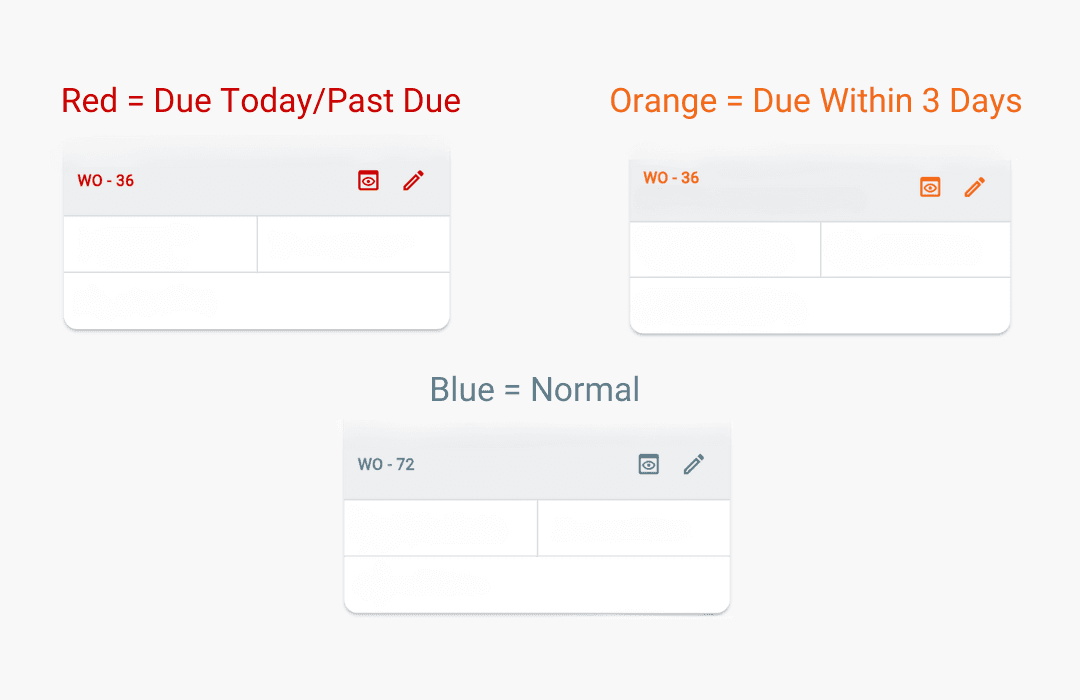
Work Order Colors
Work order colors are based on the job deadline date.
→ Deadlines are set by the office.
→ Colors help technicians quickly identify priority work.
Additional Info
Office users (Admin and Staff) manage:
→ Work order status.
→ Technician assignments.
The only exception is when a technician submits a completed work order.
When a technician selects Submit Work Order:
→ The work order moves to Service Complete status.
→ The updated status appears on the office dashboard.
→ The technician can no longer view the submitted work order.
Note: To enable technicians to see more statuses (Site Survey, Waiting on Parts, Service, Service Complete) in the workspace, contact support.